From a network engineer’s perspective, when a firewall log shows Allow for a connection between a client and a server, with a tcp-reset-from-server, the first thought is to blame the server. Obviously, right? I typically ask the server team to check whether that particular port or service is open and listening. They check, it looks healthy, and life goes on. Issue solved.
Most of the time, this is true. And I wish it was that simple.
A while ago, I had to troubleshoot an issue where things were not so straightforward — and the network was actually the culprit. So how can a tcp-reset-from-server be a network problem?
I will walk through the process of troubleshooting this issue, point out the hints that led me to that conclusion, and make the case for why you need in-depth visibility into the network and a real understanding of the full architecture to get to the root cause.
Problem Scenario
An external vendor (Company A) is trying to make an HTTP API request on port 8077 to another organization’s URL (Company B):
http://stage.companyb.com:8077
The server sits in the DMZ, so this is a typical external web server setup: edge firewalls handling both ingress and egress on either side of the data centers.
There are two scenarios — one that fails, and one that works — as shown in the diagram.
- Non-working: The API call is initiated from inside Company A’s data center to Company B’s URL.
- Working: The same API call works from anywhere else on the internet. For example, a user at home can open Postman and make a simple HTTP request to the same URL.
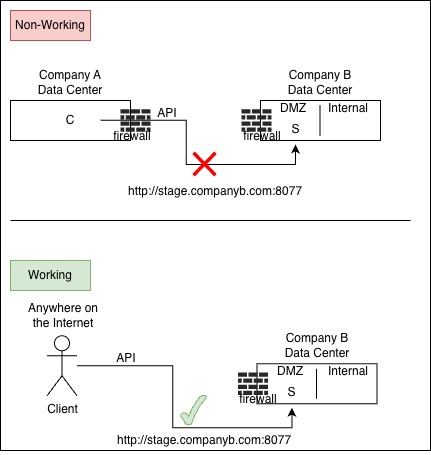
Okay, so imagine getting a call with this problem statement. Confused as I am? What question would you ask next to figure out where to start?
Evidence Gathering
There are a few things you can do here.
1. Check Company B firewall logs.
I usually start here to make sure we clear any blockers on our side. The firewall logs showed this:
| CompanyA- Src IP | Dst URL | CompanyB – Dst IP | DNAT – Private IP | Firewall Action | Reason |
| 1.1.1.1 | http://stage.companyb.com:8077 | 2.2.2.2 | 10.2.2.2 | Block | tcp-reset-from-server |
| Any public IP | http://stage.companyb.com:8077 | 2.2.2.2 | 10.2.2.2 | Allow |
2. Check with the server.
In this case, the server looked fine. So why is the firewall log showing a TCP reset coming from the server?
One important detail: if the client comes from anywhere except Company A, the HTTP API call works. That means we can’t just blame the server. The next logical step is to look at Company A’s firewall. Is Company A blocking their own outbound HTTP API call?
3. Ask more questions about Company A.
What’s else at play here? Even if Company A is blocking the outbound call, that still doesn’t explain why our firewall sees a tcp-reset-from-server on a connection that never should have made it that far. Keep that thought in the back of your mind.
Then, let’s say new evidence showed up. I found a server at Company B that does work — the production call from Company A to Company B server succeeds. Add that to the evidence pile.
| CompanyA- Src IP | Dst URL | CompanyB – Dst IP | DNAT – Private IP | Firewall Action | Reason |
| 1.1.1.1 | http://stage.companyb.com:8077 | 2.2.2.2 | 10.2.2.2 | Block | tcp-reset-from-server |
| Any public IP | http://stage.companyb.com:8077 | 2.2.2.2 | 10.2.2.2 | Allow | |
| 1.1.1.1 | https://prod.companyb.com | 3.3.3.3 | 10.3.3.3 | Allow |
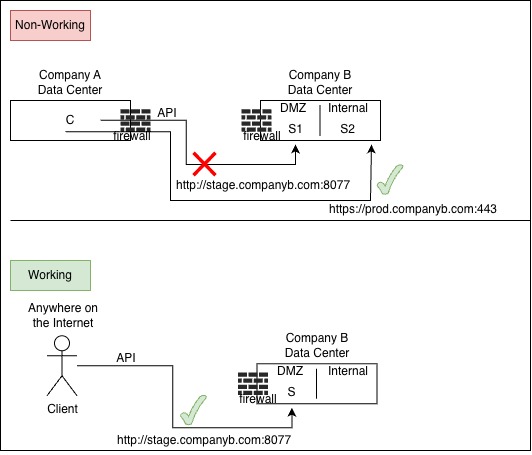
Interesting. We had already ascertained that Company A’s outbound connection is solid. Traffic is allowed. Strange. That still doesn’t explain why the connection is failing.
4. Let’s do a deeper dive.
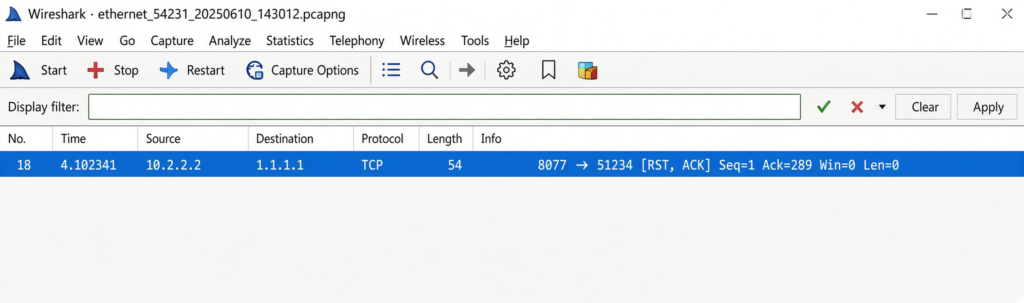
At this point, I decided to run a packet capture on Company B’s firewall. Why not? I had nothing else to go on. This is where a simple — but subtle — packet analysis can reveal a lot, and how it pointed me to the next step.
For reference, this capture was taken on the Palo Alto firewall. Imagine seeing this:
- Palo Alto CLI global counter results
admin@PA-2050(active)> show counter global filter delta yes severity drop

Global counters:
Elapsed time since last sampling: 5.336 seconds

name                                   value     rate severity  category  aspect    description
--------------------------------------------------------------------------------
flow_policy_deny                          18       3 drop      flow      session   Session setup: denied by policy
flow_tcp_non_syn_drop                     342      64 drop      flow      session   Packets dropped: non SYN TCP without session match
flow_fwd_l3_ttl_zero                       2       0 drop      flow      forward   Packets dropped: IP TTL reaches zero
flow_fwd_l3_mcast_drop                     7       1 drop      flow      forward   Packets dropped: no route for IP multicast
--------------------------------------------------------------------------------
Total counters shown: 4
--------------------------------------------------------------------------------
A quick look at common causes for flow_tcp_non_syn_drop:
- Firewall saw a TCP packet that was not SYN and had no existing session.
- Asymmetric routing, mid-flow traffic hitting the firewall, session timeout then leftover packets, or a RST/ACK arriving with no session
Interesting.
Where is the TCP SYN to the server at Company B? Why is the Palo Alto only seeing a TCP SYN-ACK from the server — without ever seeing the SYN?
That’s when it clicked: something was missing from the architecture. That piece of evidence was the key. It pushed me to dig deeper into the design and ask whether something else was sitting in the path. The SYN has to come from somewhere, right?
Long story short, I kept asking questions — more context from both vendors and internal engineers. And it turns out there was another firewall in play. (Sigh.)
I had to revise the diagram to reflect the real flow, as shown below.
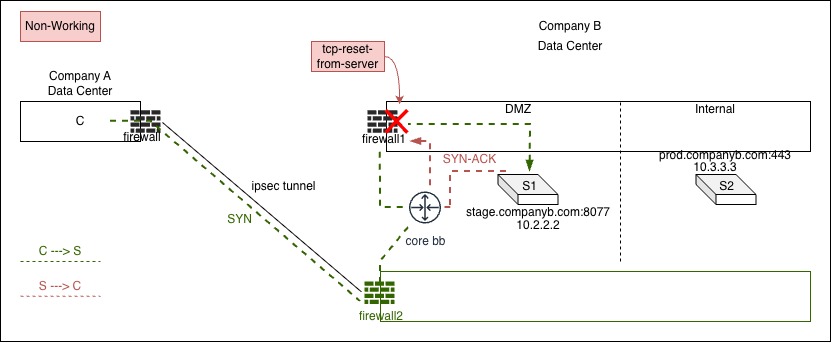
There are two firewalls: one dedicated to IPsec tunnels with external vendors (green), and one dedicated to the production environment (black).
- Routing from the core backbone into the DMZ has to go through firewall 1 for inspection.
- So when the server sends a TCP SYN-ACK, the return path is asymmetric — that SYN-ACK goes back through firewall 1.
- Firewall 1 never saw the original TCP SYN, so the SYN-ACK looks like it came out of nowhere.
- The firewall does what it’s supposed to do: it blocks it to prevent a connection it doesn’t recognize.
That explained the “why” — and it gave the team the confidence to pursue the fix.
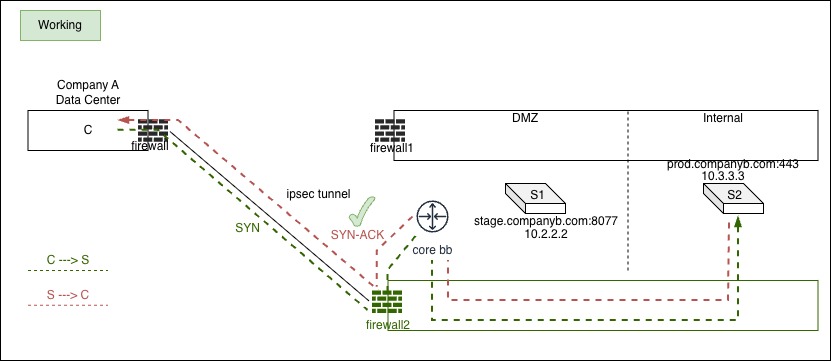
- Routing from the IPsec tunnel to Company B’s firewall 2 internal zone has a direct path into Internal. That routing is symmetrical — so it works.
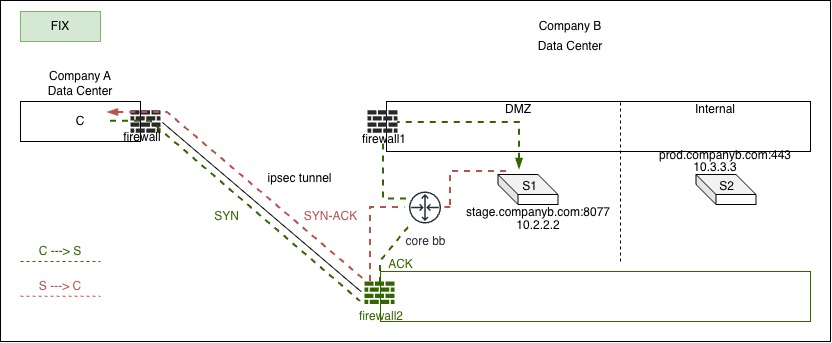
Solution: Check routing on core backbone switches. Point the core backbone static route for the stage.companyb.com server (10.2.2.2) back to firewall 2, and make sure the interesting traffic over the Ipsec tunnel is allowed between Company B’s firewall 2 and Company A’s firewall.
Conclusion
With that said — is a tcp-reset-from-server a network issue? Well, it depends. Sometimes the answer is straightforward. Other times, it isn’t. You have to understand the problem in front of you and the architecture you’re working with.
In this case, having the right architecture documentation — and actually understanding it — is what unblocked a critical issue that was holding the project back.
Keep in mind this is the simplified version. Production had flows across 3+ data centers and 7+ URLs (aka web servers), some working and some not. It wasn’t until I slowed down and documented each flow, one by one, between Company A <-> Company B, that the root cause became clear.
I think this is a good study case to understand because it sits at the intersection of application architecture, business context, and source/destination flow. Production environments can be messy. They’re not always clean or perfectly documented. You have to ask a lot of questions — especially if you’re unfamiliar with the setup — and build a mental map of the systems you’re dealing with. That’s the blend I have to get comfortable with when troubleshooting under pressure in a large enterprise environment.
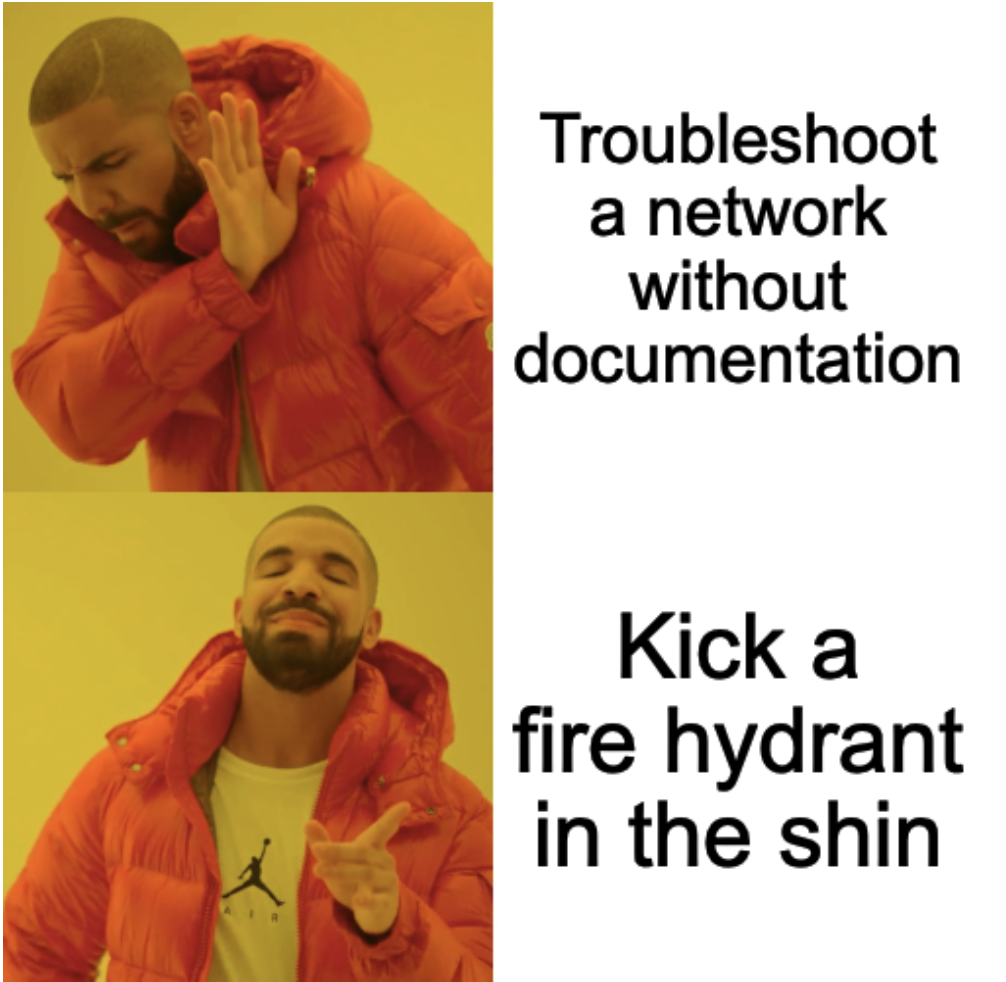
When I have to deal with issues without documentation, this is the meme that pops into my head:
I love seeing other people troubleshoot. It is fun to see how their mind works solving the issue. This is why they pay you the big bucks. Thank you for this break down. I don’t think I fully understand that flow yet, but I am going to read it a few more times to get it to click. Thanks Kristie!!!
An Engaging Blog Post